
How to See What ChatGPT Actually Searches (Not What It Tells You)
When you ask ChatGPT a question that triggers a web search, it tells you what it found. But it does not tell you exactly what it searched for.
This matters more than most marketers realize.
The queries ChatGPT uses behind the scenes are often different from what you typed. Sometimes dramatically different. And if you want to optimize your website for AI search visibility, knowing these actual queries gives you a direct window into how AI chatbots discover and retrieve information.
Here is how to see them, and more importantly, how to turn this into a repeatable research method for your business.
The Chrome DevTools Method
This works in Chrome (and Chromium-based browsers like Edge or Brave). You will use the browser's built-in developer tools to inspect network traffic and find the actual queries ChatGPT sends.
Here is a video tutorial if you prefer.
Before You Start
Make sure you are logged into ChatGPT and have a conversation where ChatGPT searched the web. You will know it searched because you see the "Searching..." indicator or citations in the response.
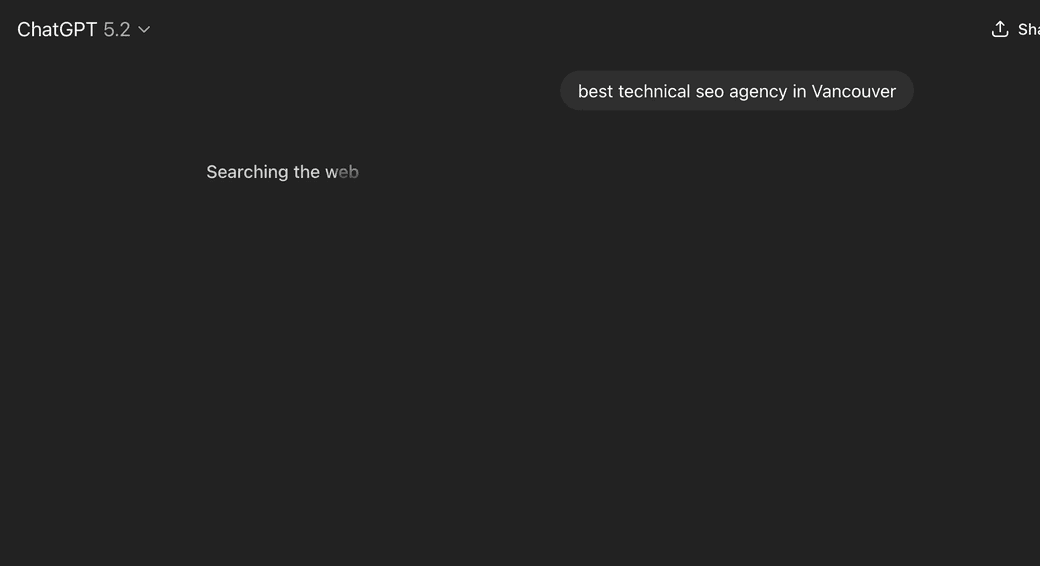
If you are starting fresh, ask a question that requires current information. Something like "What are the best productivity apps in 2026?" or "What is the current price of Bitcoin?" will trigger a web search.
Step 1: Copy the Conversation ID
Look at your browser's address bar. The URL follows this pattern:
The string after /c/ is your conversation ID. Select and copy it.
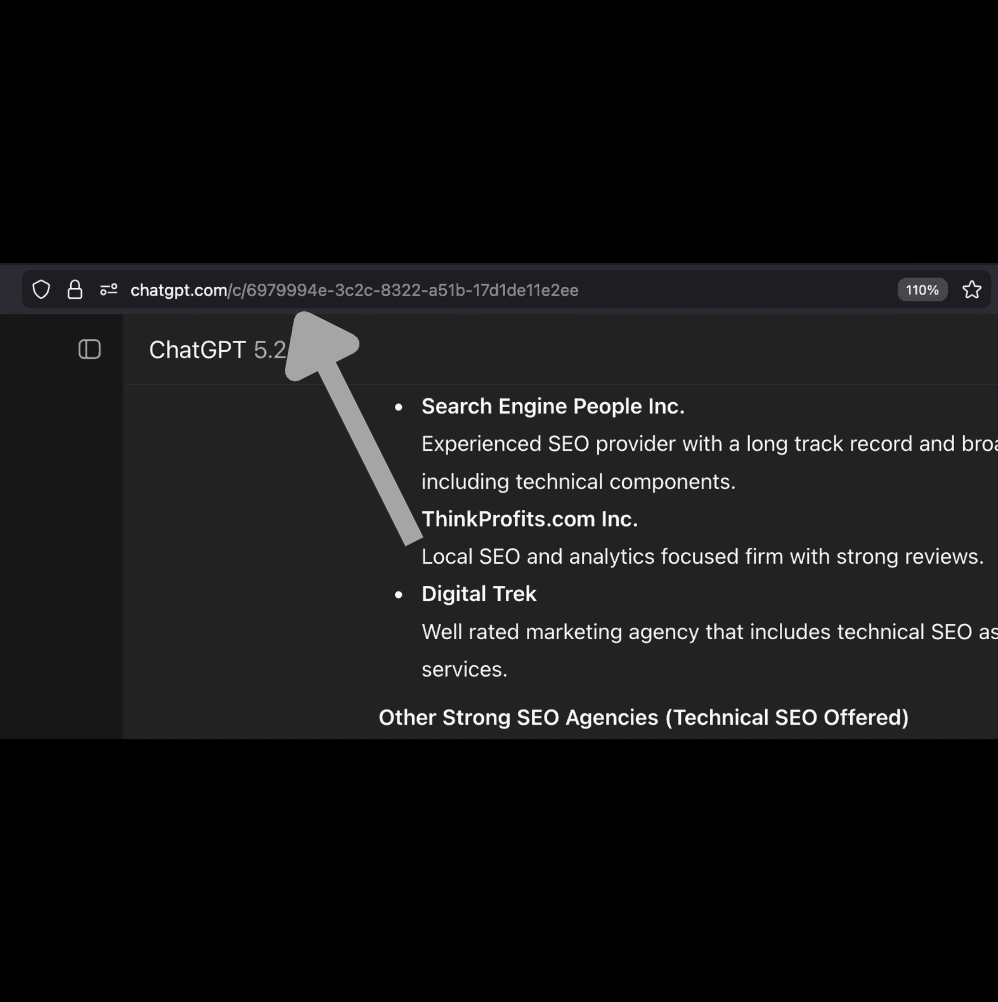
Why this matters: DevTools captures hundreds of network requests. The conversation ID lets you filter down to just the requests related to your specific chat.
Step 2: Open Chrome DevTools
Right-click anywhere on the page and select Inspect. Or use keyboard shortcuts:
Windows/Linux: Ctrl + Shift + I
Mac: Cmd + Option + I
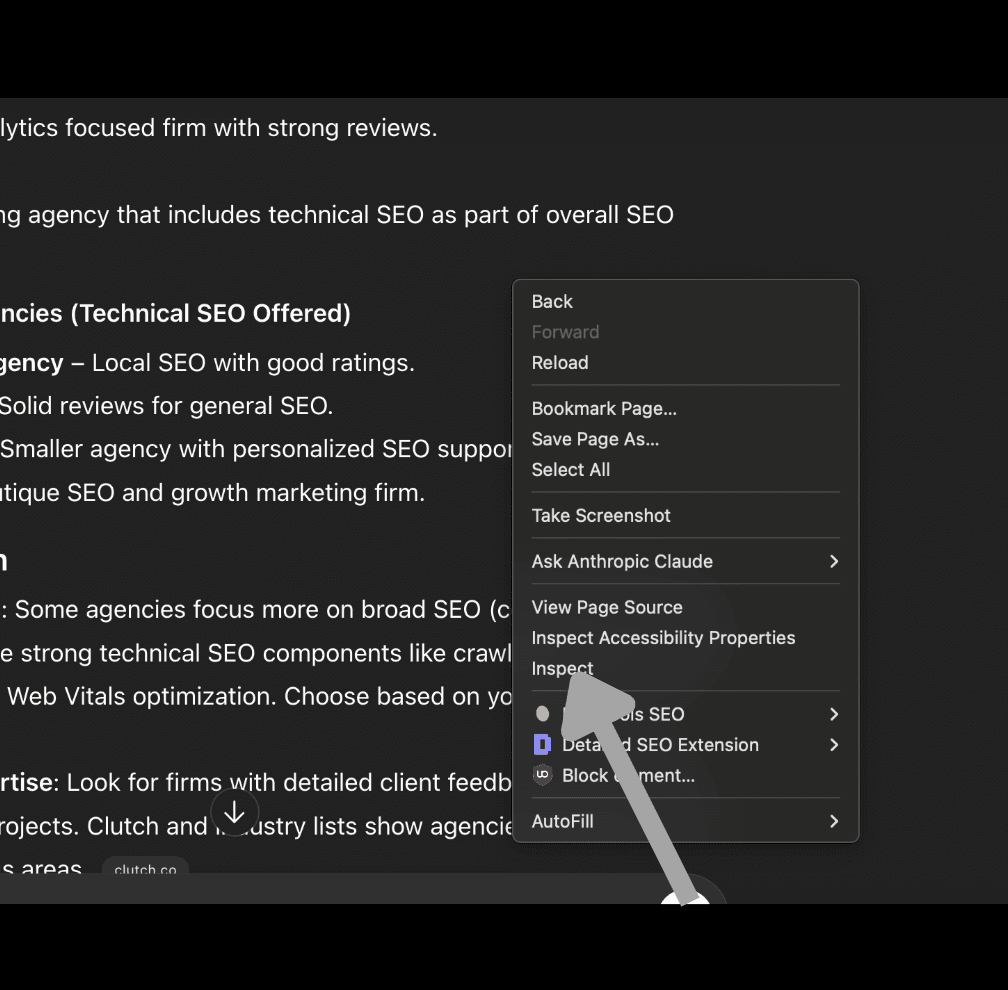
A panel opens at the bottom or side of your browser. This is Chrome DevTools.
Step 3: Navigate to the Network Tab
Click the Network tab at the top of the DevTools panel. This tab shows all HTTP requests the page makes.
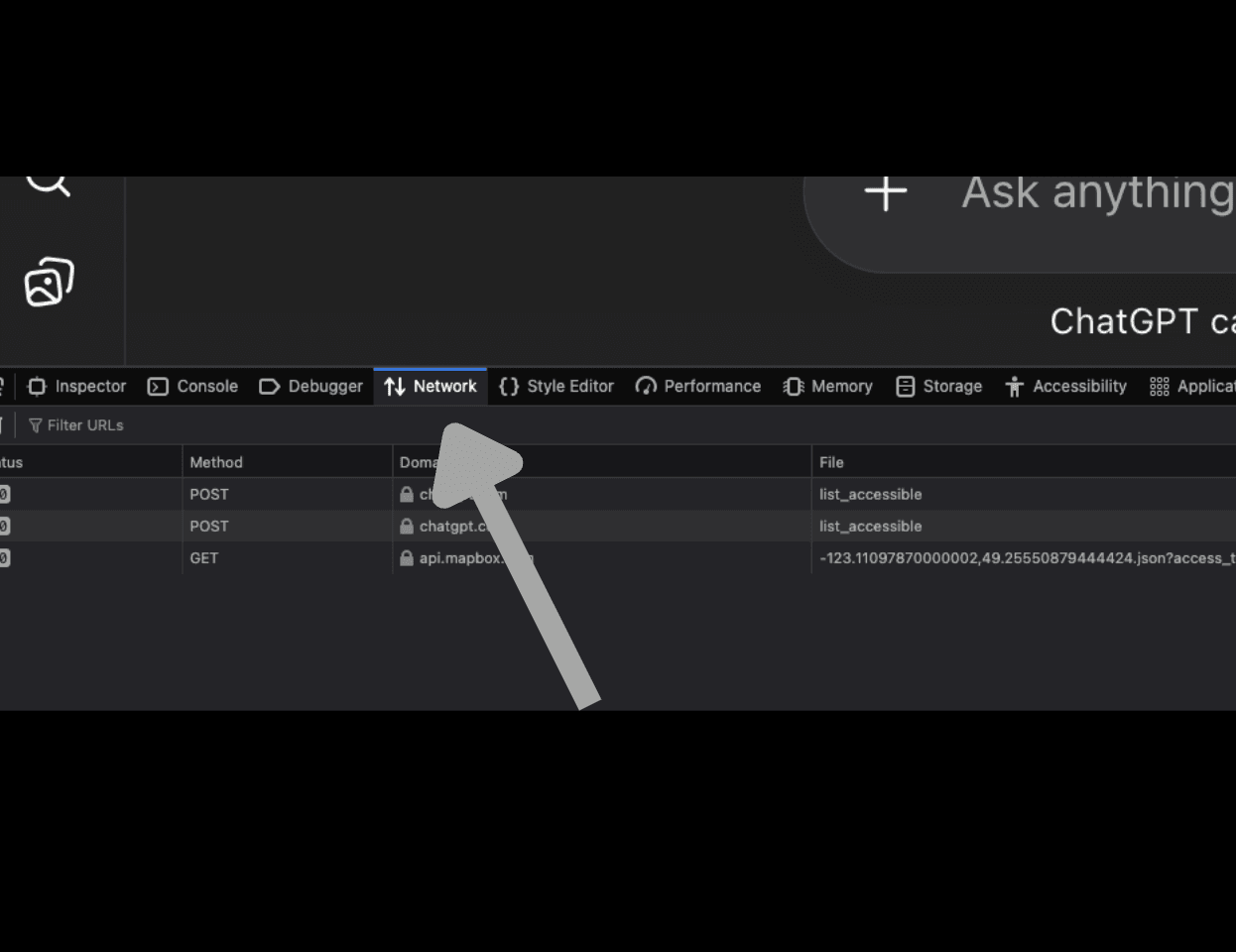
Pro tip: If you do not see the Network tab, click the >> arrows to reveal hidden tabs.
Step 4: Refresh the Page
Press F5 or click your browser's refresh button. This reloads the conversation and captures fresh network traffic in DevTools.
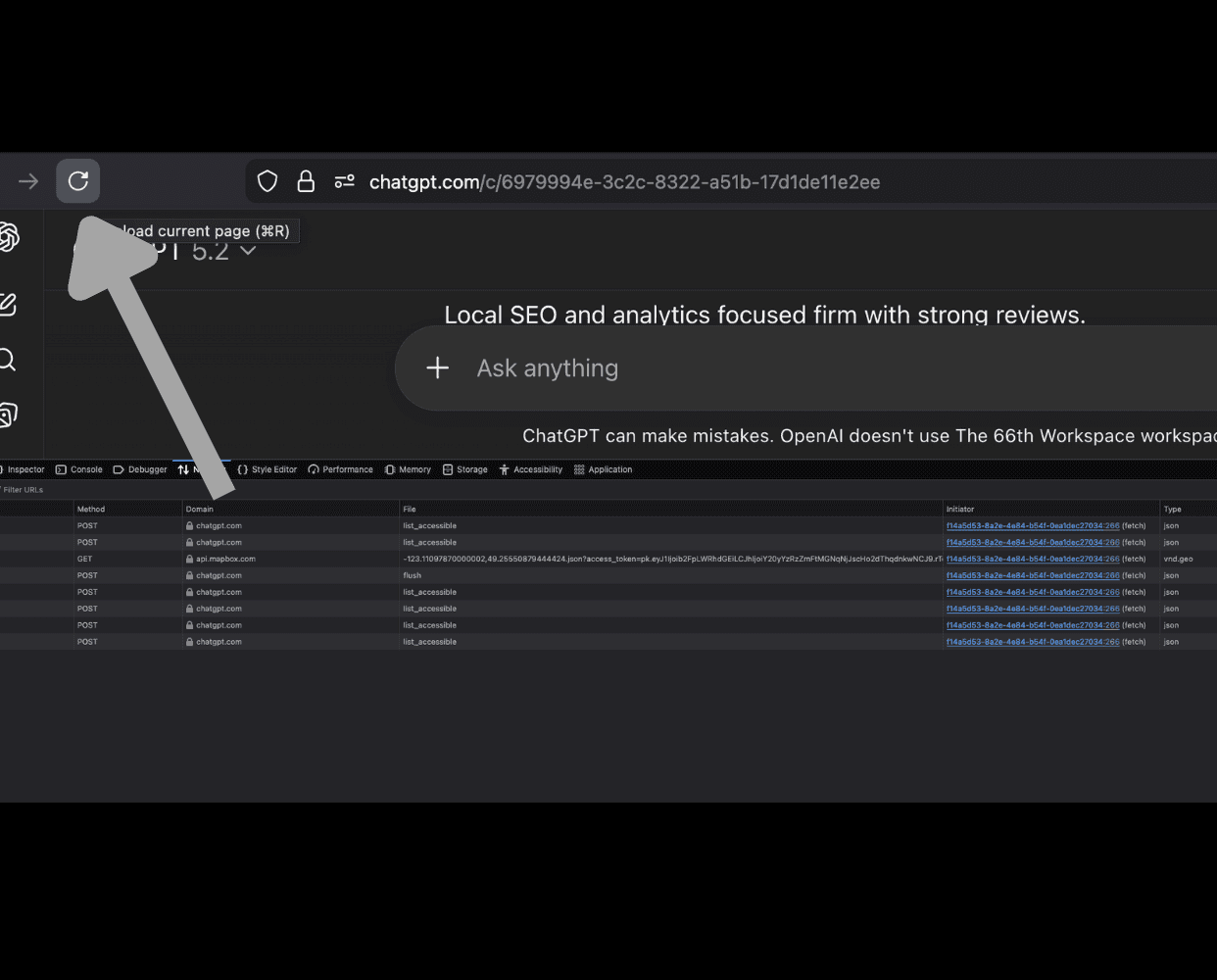
You will see requests start populating in the Network panel. There may be dozens or hundreds depending on page complexity.
Step 5: Filter by Your Conversation ID
At the top of the Network panel, you will see a text input field. It might say "Filter" or just show a magnifying glass icon.
Click inside this field and paste the conversation ID you copied earlier.
What happens next: The list of requests shrinks from potentially hundreds down to just a few. You are now seeing only the requests related to your specific conversation.
If nothing appears after filtering:
Make sure you copied the complete conversation ID (everything after /c/)
Check that you refreshed the page after opening DevTools
Step 6: Find the Request Containing Search Data
After filtering, you will see a short list of requests with columns like Name, Status, Type, Initiator, and Size.
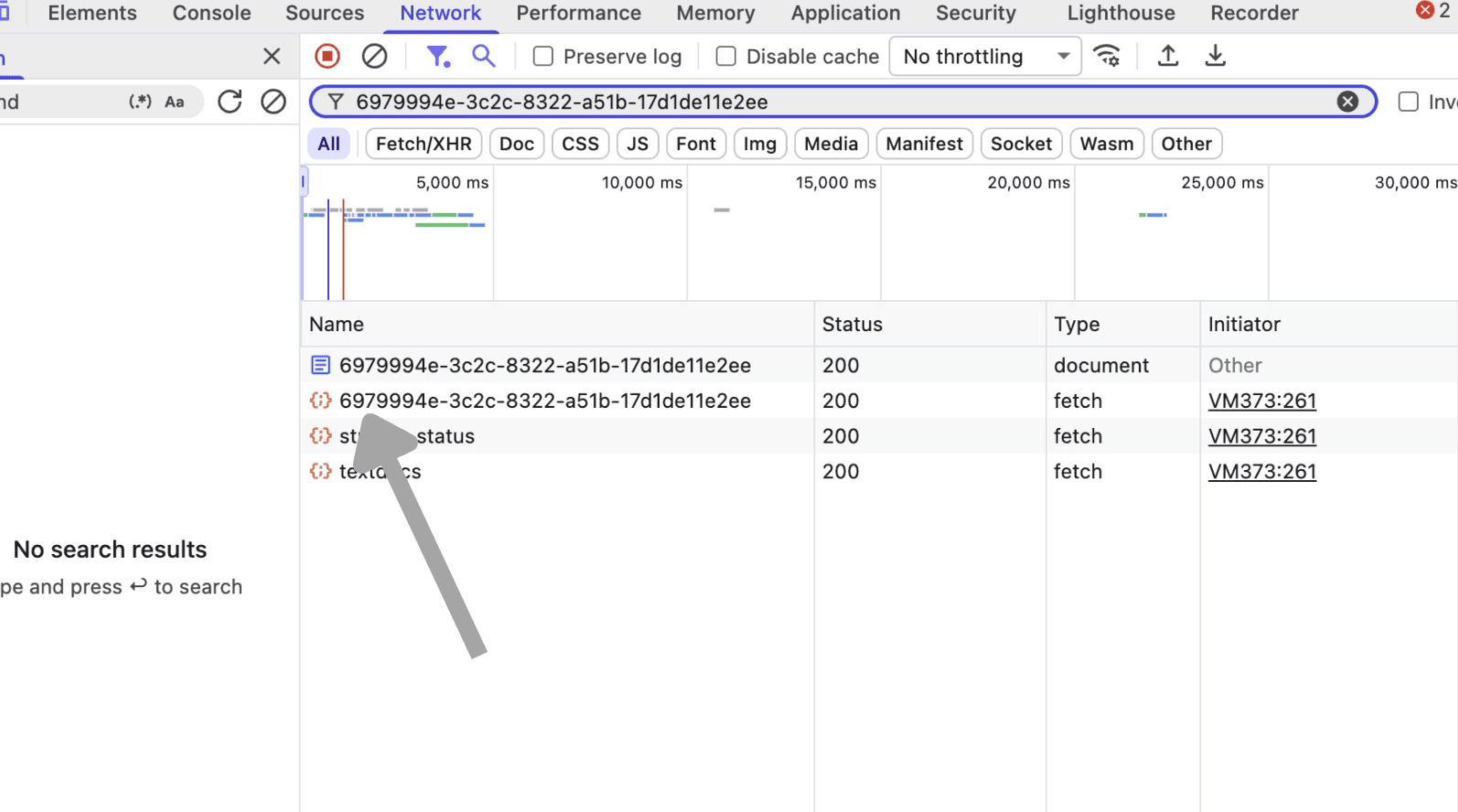
Look for the row with a curly braces icon {} next to the conversation ID. This is the JSON request containing your search data.
In your filtered list, you will see several entries. The one you want has:
The curly braces {} icon (indicates JSON data)
Your conversation ID as the name (the same string you filtered by)
Type showing as fetch
A larger file size (typically 15KB or more)
Other entries like stream_status or textdocs are not what you need. Click on the row with the curly braces icon and your conversation ID, then proceed to the Response tab.
Step 7: Open the Response Tab
With a request selected, look at the panel below (or to the side). Click the Response tab.
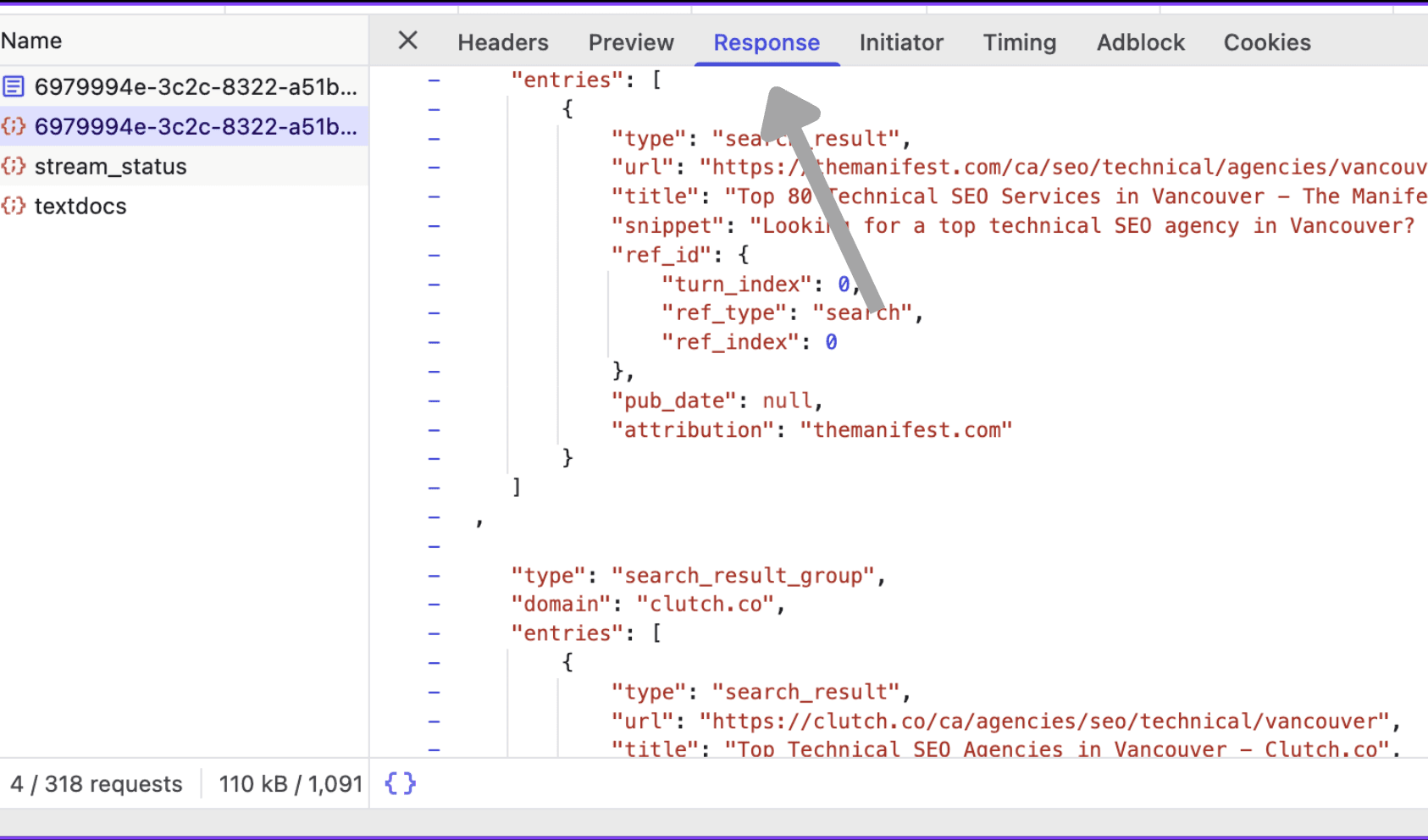
You will see raw data - this is the actual response ChatGPT's servers sent to your browser. It looks like JSON with lots of brackets and quotation marks.
Step 8: Search for Queries
Press Ctrl + F (Windows) or Cmd + F (Mac) to open the search box within the Response panel.
Type "queries" and press Enter.
The search highlights matches in the response data. Navigate between matches using the up/down arrows in the search box.
Step 9: Read the Actual Queries
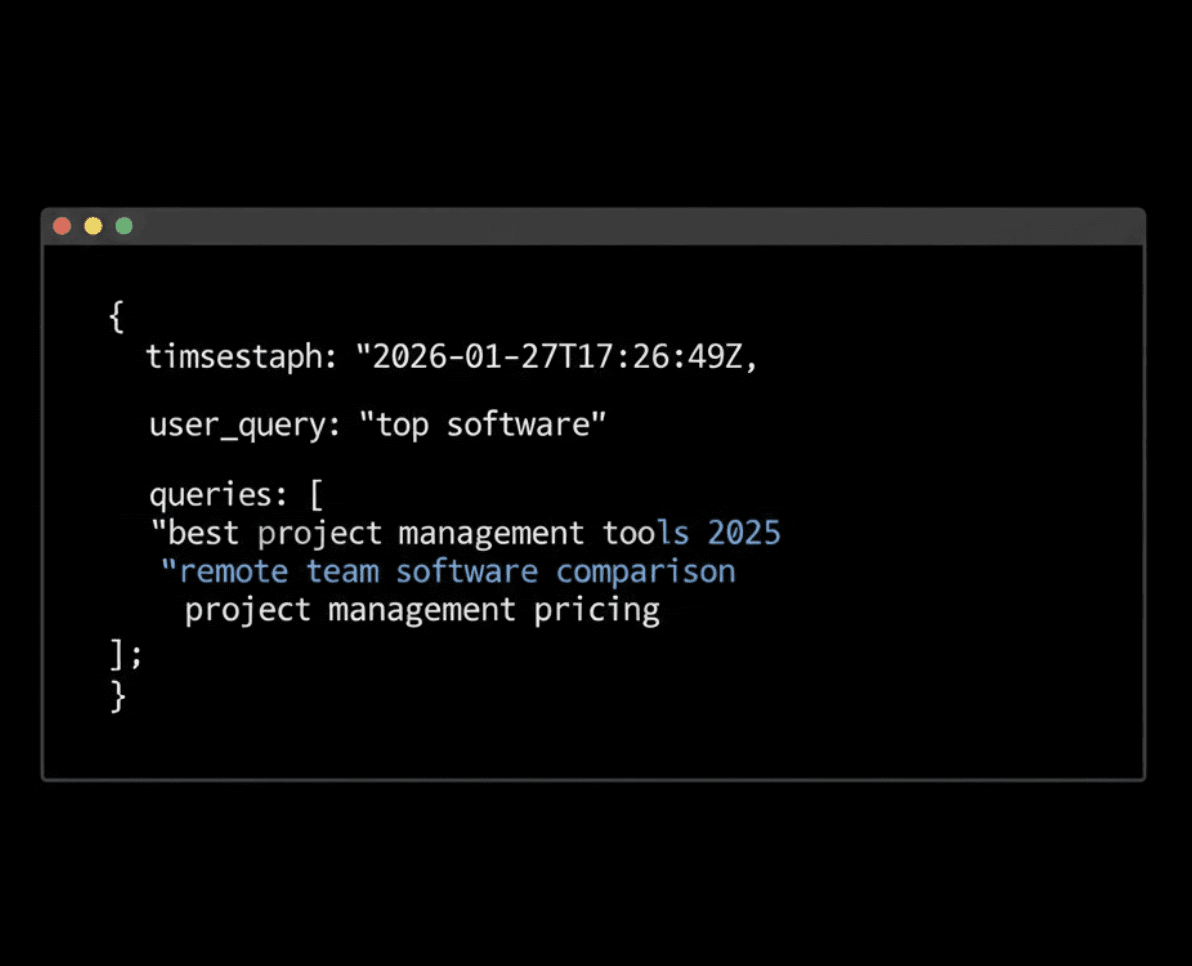
When you find a match, you will see something like this:
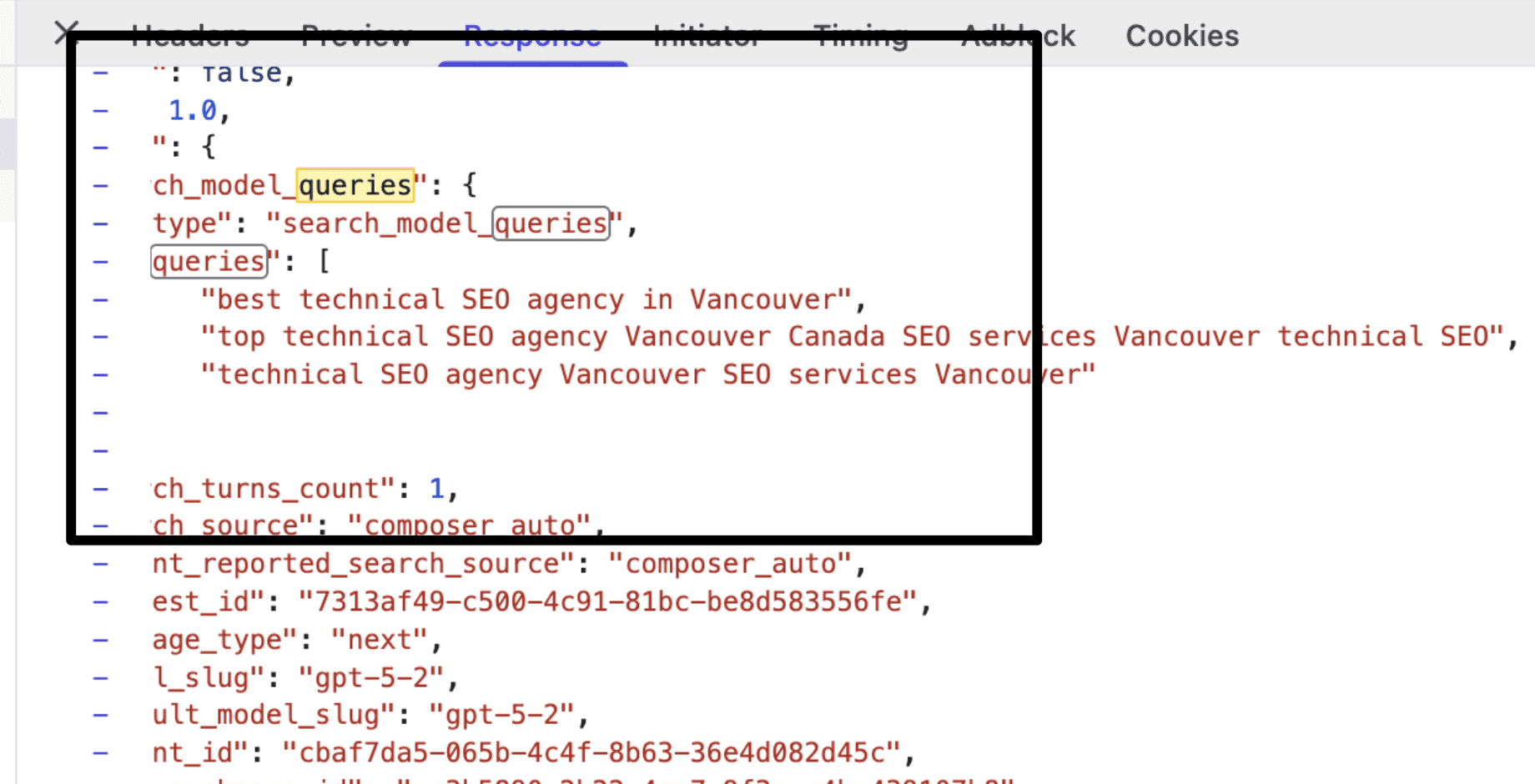
These are the exact search terms ChatGPT used to find information for your question.
How to Use Web Search Query Data
You now have the exact keywords ChatGPT used. Here is what to do with them.
Add These Terms to Existing Content
If you already have a page targeting this topic, weave the query terms into your content semantically.
Look at the queries ChatGPT generated for "best technical SEO agency in Vancouver":
"best technical SEO agency in Vancouver"
"top technical SEO agency Vancouver Canada SEO services Vancouver technical SEO"
"technical SEO agency Vancouver SEO services Vancouver"
Pull out the key terms: "technical SEO agency," "top/best technical SEO agency," "Vancouver," "SEO services," "Canada," "best," "top."
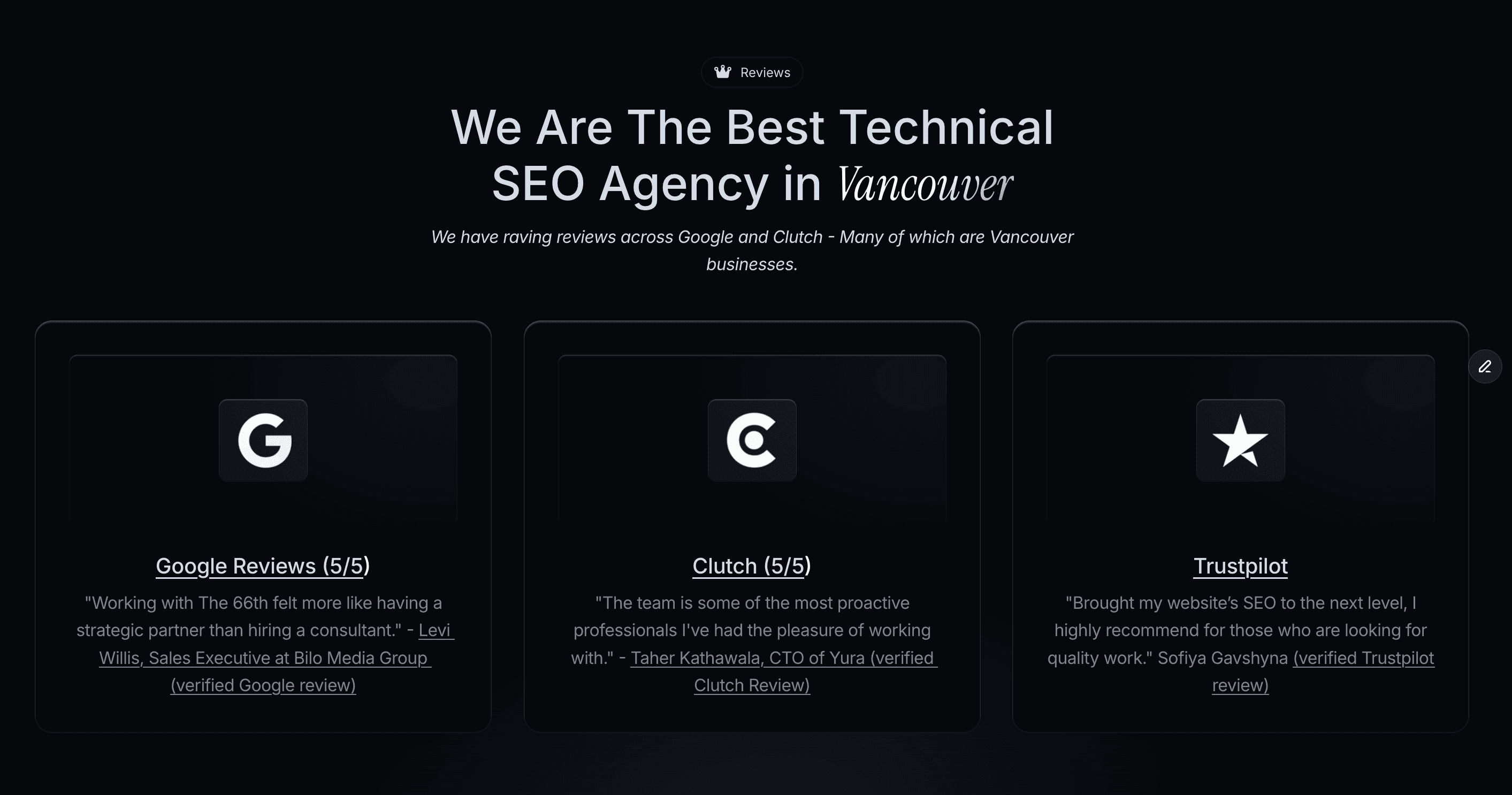
I just added this social proof section with the heading we found to my existing page for Technical SEO Agency in Vancouver.
Now update your existing page:
Add these terms naturally to your headings, body copy, and metadata
Include location qualifiers like "Vancouver" and "Canada" if you serve that area
Use variations: "technical SEO services," "technical SEO agency," "SEO services Vancouver"
You are not keyword stuffing. You are ensuring your content includes the language ChatGPT actually searches for.
Create New Content for Gaps
If you do not have content matching these queries, create it.
For the queries above, you might need:
Query | Content to Create |
|---|---|
"best technical SEO agency in Vancouver" | A technical SEO service page with Vancouver focus |
"SEO services Vancouver" | A location-specific SEO services page |
"top technical SEO agency" | A listicle featuring top agencies (including yourself) |
Each query ChatGPT runs is a content opportunity. If your site does not have a page that directly answers that query, you are invisible for that search.
Structure for AI Extraction
When creating or updating content, structure it so ChatGPT can easily pull an answer:
Lead with direct answers. Do not bury your point in paragraph five. State it immediately.
Use headings that match queries. If ChatGPT searches "technical SEO agency Vancouver," having an H2 that says "Technical SEO Agency in Vancouver" signals relevance.
These are traditional keyword searches - the exact terms ChatGPT typed into a search engine.
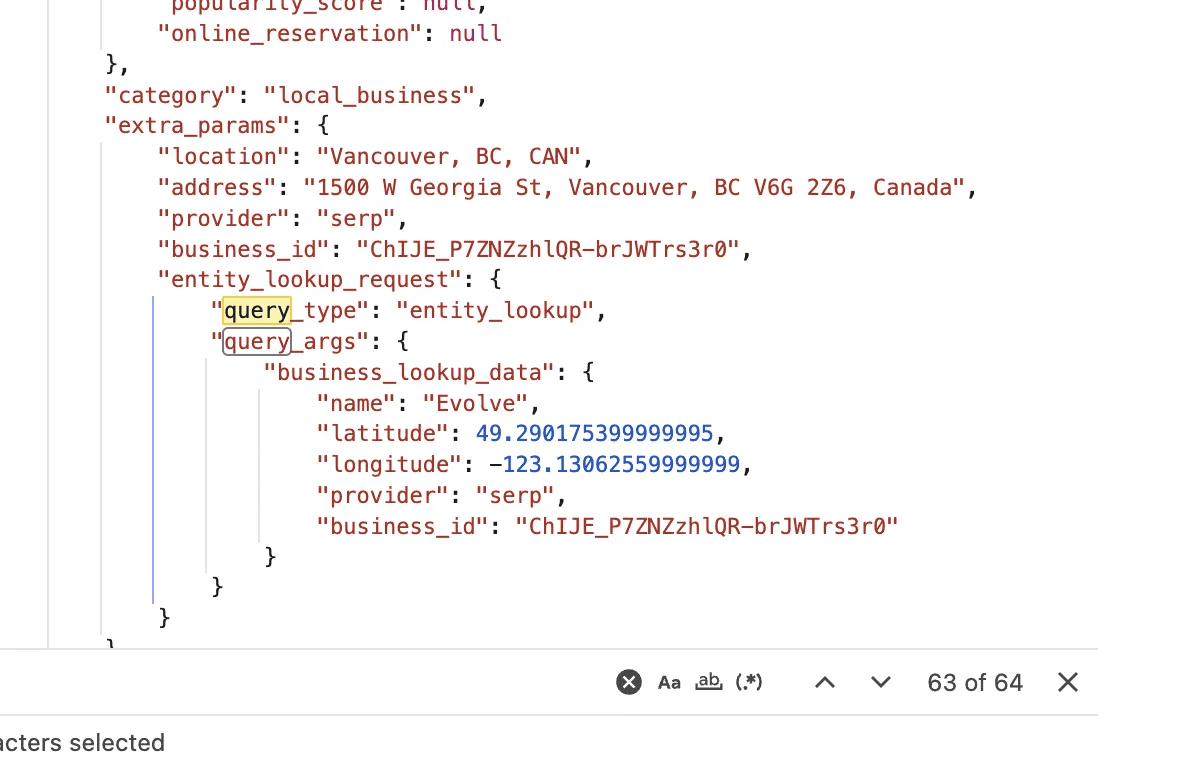
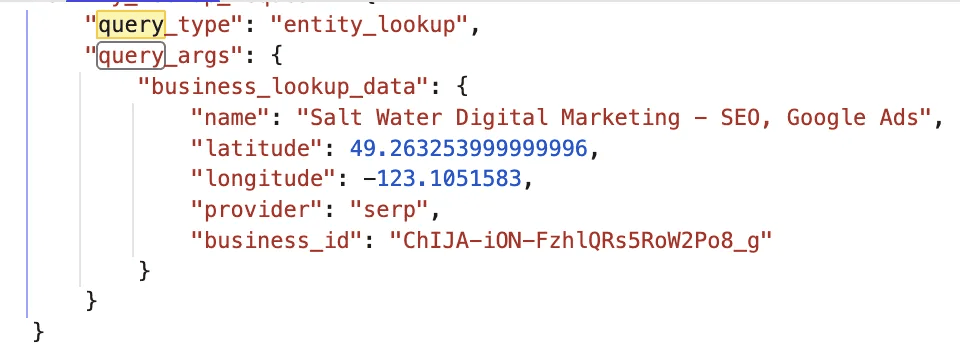
Entity lookup queries look like this:
Entity lookups happen when you ask about local businesses, restaurants, services in a specific area, or anything requiring location data. The name field shows exactly what business or entity ChatGPT looked up.
Understanding Entity Lookups: What They Are and Why They Matter
This section explains a concept that most marketers do not know about. If you want to understand how AI systems find and recommend businesses, read carefully.
What Is an Entity?
In the context of search and AI, an entity is anything that can be distinctly identified and described with structured data. This includes:
Businesses - "The 66th" is an entity with a name, location, services, and relationships
People - "Liam Lytton" is an entity with a role, expertise, and connections
Places - "Vancouver, BC" is an entity with coordinates, population, and attributes
Concepts - "SEO" is an entity with definitions, related topics, and associations
Entities are not just words. They are things that exist in databases with verified, structured information attached to them.
How Search Engines Build Entity Knowledge
Google and other search engines maintain massive databases called knowledge graphs. These are not lists of web pages. They are structured databases of entities and the relationships between them.
When you search "The 66th Vancouver," Google does not just look for pages containing those words. It checks whether an entity called "The 66th" exists in its knowledge graph, and if so, pulls structured data about it:
Official business name
Address and coordinates
Phone number
Business category
Hours of operation
Reviews and ratings
Connected entities (founder, services, location)
This structured data comes from multiple sources: Google Business Profile, business directories, your website's schema markup, Wikipedia, government registries, and more. Google cross-references these sources to build confidence that an entity is real and that the data is accurate.
Why ChatGPT Uses Entity Lookups
When you ask ChatGPT "What are the best SEO agencies in Vancouver?", it needs to answer with real businesses, not hallucinated ones.
Here is the problem: ChatGPT's training data is static. It learned about businesses that existed when it was trained, but businesses open, close, move, and change constantly. If ChatGPT only used its training data, it would recommend closed restaurants and defunct agencies.
Entity lookups solve this problem.
Instead of relying on stale training data, ChatGPT queries live entity databases - likely Google's Places API or similar services. These databases contain current, verified business information that gets updated continuously.
The mechanism works like this:
You ask ChatGPT about "SEO agencies in Vancouver"
ChatGPT identifies this as a local business query requiring current data
It sends entity lookup requests to a business database
The database returns structured data: business names, exact coordinates, category, Place IDs
ChatGPT uses this verified data to build its response
Look at the entity lookup data again:
That business_id starting with "ChIJ" is a Google Place ID - a unique identifier in Google's knowledge graph. ChatGPT is not just searching for text. It is querying a structured database and retrieving verified entities.
Here are some examples:
—
What This Means for Your Business
If ChatGPT is pulling from entity databases rather than just crawling websites, your optimization strategy needs to account for this.
You need to exist as a verified entity, not just a website.
A website with great content about SEO services is not enough. If your business does not exist as a structured entity in the databases ChatGPT queries, you will not appear in entity lookup results. Period.
Think of it this way: your website is your storefront. Your entity presence is your business registration. ChatGPT checks the registry before recommending you.
How to Optimize for Entity Lookups
Based on how entity lookups work, here are the specific actions that increase your chances of appearing in AI responses to local and business queries.
1. Claim and Optimize Your Google Business Profile
Your GBP is the foundation of your entity presence. ChatGPT's entity lookups pull directly from Google's business database.
Actions to take:
Claim your listing if you have not already
Use your exact legal business name (no keyword stuffing)
Verify your address and ensure the map pin is accurate
Select the most specific primary category for your business
Add all relevant secondary categories
Complete every field: hours, services, attributes, description
Upload high-quality photos regularly
Post updates weekly to signal an active business
2. Build NAP Consistency Across the Web
NAP stands for Name, Address, Phone number. These three data points are how databases verify that mentions of your business across the web refer to the same entity.
The problem: If your business is listed as "The 66th" on your website, "The Sixty-Sixth" on Yelp, and "66th Digital" on LinkedIn, databases cannot confidently link these as the same entity. Your entity signal is fragmented.
Actions to take:
Audit every place your business is mentioned online
Standardize your business name exactly (including punctuation and spacing)
Use the identical address format everywhere (e.g., "Street" vs "St.")
Use one phone number consistently
Create a reference document with your exact NAP to copy/paste
3. Get Listed in Business Directories
Directories are not just for backlinks anymore. They feed into the knowledge graphs that AI systems query.
High-priority directories:
Google Business Profile (foundation)
Bing Places for Business
Apple Maps Connect
Yelp
Industry-specific directories (for SEO: Clutch, GoodFirms, etc.)
Local directories (Chamber of Commerce, local business associations)
Data aggregators (Foursquare, Factual)
Each listing reinforces your entity. The more places you exist as a structured, verified business, the more confident AI systems become that you are real.
4. Implement Schema Markup on Your Website
Ok look - I am very conflicted about Schema. There is a good chance it doesn't make a massive difference, but even a 5-10% difference is worth applying to your own site or clients' site.
Schema markup is code that tells search engines and AI systems about your business in a structured format they can read directly.
Essential schema types for businesses:
LocalBusiness or more specific types (ProfessionalService, Restaurant, etc.)
Organization with your official name, logo, and contact info
Person schema for founders and key team members
Service schema for what you offer
Review schema for testimonials
SameAs properties linking to your social profiles and directory listings
Schema does not guarantee you will appear in entity lookups, but it gives AI systems structured data about your business that matches what they find in other databases.
5. Build Entity Associations
Entities do not exist in isolation. They have relationships to other entities. Strengthening these associations builds your entity profile.
Ways to build associations:
Get mentioned on Wikipedia or industry wikis (if notable enough)
Appear in news articles that mention your business by name
Get interviewed on podcasts or publications where you are named
Contribute to industry reports that credit your business
Partner with other recognized entities in your space
When multiple authoritative sources mention your business in connection with your industry, location, or services, databases build stronger entity profiles for you.
6. Use Press Releases to Build Entity Recognition
Press releases distributed through newswires get picked up by news sites and indexed quickly. This creates entity signals that AI systems can find.
The strategy:
Write a press release with your target keyword in the headline and first sentence, along with your company name.
For example, if you want to appear for "best technical SEO agency in Vancouver," your press release headline might be:
"The 66th Named Among Best Technical SEO Agencies in Vancouver for 2026"
And your first sentence:
"The 66th, a Vancouver-based search optimization firm, has been recognized as one of the best technical SEO agencies in Vancouver following a year of client growth and AI search innovation."
Do not include hyperlinks to your website. Newswires that allow links often get flagged as spammy by search engines. An unlinked brand mention from a legitimate news source carries more entity weight than a linked mention from a low-quality directory.
The goal is not a backlink. The goal is getting your company name associated with your target keyword across multiple news sources that feed into knowledge graphs.
When ChatGPT later searches "best technical SEO agency in Vancouver," it finds news articles mentioning your company in that context. This builds the entity association between your brand and that query.
Common Issues and Fixes
"I do not see any requests after filtering"
You may have opened DevTools after the page loaded. Refresh the page with DevTools already open to capture the network traffic.
"The Response tab shows 'Failed to load response data'"
The request may have timed out or been too large. Try a different request from the filtered list, or ask a new question and repeat the process.
"I cannot find 'queries' anywhere"
Not all conversations trigger web searches. If ChatGPT answered from its training data without searching, there will be no queries to find. Ask a question requiring current information to trigger a search.
"The data looks encrypted or unreadable"
Make sure you are looking at the Response tab, not Headers or Preview. The Response tab shows the raw JSON data where queries are stored.
Why ChatGPT's Queries Differ From What You Type
ChatGPT does not simply pass your question to a search engine. It interprets your intent and generates multiple targeted queries designed to gather comprehensive information.
For example, if you ask:
"What are the best project management tools for remote teams in 2025?"
ChatGPT might actually search:
"best project management software 2025"
"remote team collaboration tools"
"project management tools for distributed teams"
"top rated project management apps"
"project management software comparison"
Each query targets a slightly different angle. Together, they help ChatGPT build a complete picture before generating its response.
This is where the opportunity lies. Each of these queries represents a keyword your content could rank for. If your pages answer these specific questions clearly and directly, you are more likely to be cited in ChatGPT responses.
Start With Your Customer, Not Your Product
The real power of this method comes from thinking like your customers.
Most businesses approach keyword research backwards. They start with their product or service, then try to figure out what people might search. This leads to generic, company-centric content that misses how real people actually look for solutions.
Flip the approach.
Start with your ideal customer's problem. What question would they ask an AI chatbot when they are stuck, curious, or ready to buy?
A homeowner with a leaky faucet does not search "plumbing services Vancouver." They ask ChatGPT: "How do I fix a dripping tap?" or "Is it worth hiring a plumber for a small leak?"
A startup founder does not search "SEO agency." They ask: "How do I get my SaaS product to show up on Google?" or "Why is my website not getting any traffic?"
These natural language questions are exactly what AI chatbots are built to answer. And when you use the DevTools method to see how ChatGPT breaks down these questions into search queries, you get a roadmap of content opportunities that directly supports your ChatGPT optimization strategy.
Building a Query Research Process
Here is how to turn this technique into a systematic research method:
Step 1: Map Your Customer's Journey
List the questions your ideal customers ask at each stage:
Awareness: "What is [problem]?" or "Why does [symptom] happen?"
Consideration: "How do I fix [problem]?" or "What are my options for [solution]?"
Decision: "Best [solution] for [specific situation]" or "[Option A] vs [Option B]"
For each stage, write 5-10 questions in natural language. Write them the way a real person would speak to ChatGPT.
Step 2: Run Each Question Through ChatGPT
Ask each question to ChatGPT. Make sure it triggers a web search (you will see the search indicator).
Step 3: Extract the Actual Queries
Use the DevTools method above to see exactly what ChatGPT searched. Document every query in a spreadsheet.
Step 4: Look for Patterns
After running 20-30 questions, patterns emerge:
Repeated phrases that appear across multiple searches
Modifier words ChatGPT adds (like "2025," "best," "how to")
Related concepts you had not considered
Question formats that generate specific query types
Step 5: Create Content That Matches
Build pages and articles that directly answer the queries you discovered. Structure them so AI systems can easily extract the information:
Use the exact query language in headings
Provide direct answers in the first 1-2 sentences of each section
Include specific data, steps, or definitions
Cite authoritative sources to build trust signals
A Real Example: Local Service Business
Say you run a window cleaning company in Vancouver. Your customers do not search "window cleaning Vancouver" in ChatGPT. They ask questions like:
"How often should I clean my windows?"
"Is it safe to clean second story windows myself?"
"What is the best time of year for window cleaning?"
"How much does professional window cleaning cost in Vancouver?"
When you run these through ChatGPT and extract the actual queries, you might discover searches like:
"window cleaning frequency residential"
"DIY second floor window cleaning safety"
"professional window cleaning prices Canada 2025"
"best season for exterior window cleaning"
Now you have specific content topics. A blog post answering "How often should you clean your windows?" with specific guidance for Vancouver's climate positions you to be cited when ChatGPT answers that question.
This is generative engine optimization in practice. You are not guessing what AI systems search for. You are seeing it directly.
Comparing Traditional Keywords vs AI Queries
The difference between traditional SEO keywords and AI search queries is subtle but meaningful:
Traditional SEO Keywords | ChatGPT Actual Queries |
|---|---|
"window cleaning Vancouver" | "professional window cleaning prices Canada 2025" |
"best CRM software" | "CRM tools for small sales teams comparison" |
"plumber near me" | "emergency plumber cost late night call out" |
"SEO services" | "how to improve Google rankings for new website" |
Traditional keywords are often short and transactional. AI queries tend to be longer, more specific, and closer to how people naturally speak.
Content optimized for AI search needs to match this conversational depth. Short, keyword-stuffed pages do not perform well. Comprehensive answers to specific questions do. This applies whether you are running a local service business or an ecommerce store seeking AI visibility.
A Quick Note on "query" vs "queries"
When searching the Response data in DevTools, try both variations:
queries(plural) shows batched search termsquery(singular) may reveal additional individual searches
ChatGPT often runs multiple searches in parallel. Checking both variations ensures you capture everything.
What This Reveals About AI Search Behavior
Spending time with this method teaches you something broader about how AI systems think about information retrieval.
ChatGPT does not just search once and return results. It:
Interprets intent behind your question
Generates multiple query variations to cover different angles
Aggregates information from various sources
Synthesizes a response that draws from the best matches
Understanding this process changes how you approach content creation. You stop writing for a single keyword and start writing to answer a cluster of related queries. This concept is central to any GEO framework.
A comprehensive guide that answers 5-10 related questions from multiple angles is more likely to be cited than 10 thin pages each targeting one keyword.
Limitations to Keep in Mind
This method shows you what ChatGPT searches, but it does not show you:
How ChatGPT ranks the results it finds
Why certain sources get cited over others
The full scoring algorithm behind AI responses
For deeper insight into how AI systems evaluate and cite content, the University of Toronto's GEO research provides useful context.
The DevTools method is one piece of the puzzle. Combine it with citation analysis and content optimization for a complete AI search strategy.
Putting It Into Practice
Here is a simple workflow to start using this today:
Pick one customer segment you want to reach
Write 10 questions they might ask ChatGPT at different stages of their journey
Run each question through ChatGPT with web search enabled
Extract the actual queries using the DevTools method
Document patterns in a spreadsheet
Create or update content to match the queries you discovered
Repeat monthly as AI search behavior evolves
The brands that appear in AI search results are the ones whose content matches how these systems actually search. Now you know how to see that for yourself.
Frequently Asked Questions
Does this method work for other AI chatbots like Perplexity or Claude?
This specific DevTools method works for ChatGPT because of how OpenAI structures its network requests. Perplexity and Claude handle web searches differently, so the exact steps do not transfer directly. However, the strategic approach does. Think like your customer, ask questions they would ask, and analyze how AI systems respond. For Perplexity specifically, you can see cited sources directly in the interface, which gives you similar insight into what content gets referenced. Learn more about optimizing for Perplexity.
How often does ChatGPT change the queries it generates?
ChatGPT's query generation evolves as OpenAI updates its models and search integration. The underlying logic stays consistent: break complex questions into targeted searches. But specific phrasing and query structures may shift over time. This is why running this research monthly gives you fresh data rather than relying on outdated assumptions.
Can I use this for competitor research?
Yes. Think about questions your competitors' customers might ask. Run those through ChatGPT and extract the queries. You will see exactly what search terms lead to your competitors being cited, and identify gaps where your content could appear instead. This pairs well with reverse engineering AI search strategies.
What if ChatGPT does not trigger a web search for my question?
ChatGPT only searches the web when it determines current information is needed. Questions about established facts, historical topics, or general knowledge often get answered from the model's training data without a search. To trigger a search, ask about recent events, current prices, "best of 2025" lists, or time-sensitive information. Adding phrases like "right now" or "currently" can help.
How many queries does ChatGPT typically run for one question?
It varies based on question complexity. Simple questions might generate 2-3 queries. Complex questions with multiple angles can generate 5-10 or more. The more specific and detailed your question, the more queries ChatGPT tends to run to gather comprehensive information.
Is this method against ChatGPT's terms of service?
No. You are simply using your browser's built-in developer tools to view network traffic from a service you are already using. This is standard web development practice and does not involve any hacking, automation, or unauthorized access. You are viewing data your own browser receives.
How do I know if my content is actually getting cited by ChatGPT?
Track brand mentions in AI search by regularly asking ChatGPT questions your target customers would ask. Note when your brand, website, or content appears in responses. You can also use Google Search Console to identify traffic from AI referrers, though this data is still evolving. Our guide on finding AI search queries in Search Console covers this in detail.
Should I optimize for ChatGPT queries or Google keywords?
Both, but understand they serve different purposes. Google keywords capture search intent at the moment someone types a query. ChatGPT queries capture conversational intent when someone asks a question naturally. The good news: content that answers specific questions well tends to perform on both platforms. Focus on comprehensive, well-structured answers rather than keyword density. This aligns with how SEO still matters in 2025 alongside AI optimization.
What content format works best for ChatGPT citations?
ChatGPT tends to cite content that provides clear, direct answers with specific data points. Formats that perform well include:
Definition-style openings that answer "what is" questions immediately
Numbered lists and steps for "how to" questions
Comparison tables for "which is better" questions
Statistics with sources for credibility signals
FAQ sections that address related questions
Structure your content so AI can easily extract the answer without reading entire paragraphs. Learn more in our content optimization for AI guide.
Can small businesses compete with big brands in AI search?
Yes, often more easily than in traditional search. AI chatbots look for the best answer to a specific question, not necessarily the biggest brand. A local plumber with a detailed page answering "How much does emergency pipe repair cost in Vancouver?" can get cited over a national chain with generic content. Specificity and depth beat brand recognition in AI search. This is especially true for startups focusing on GEO and small businesses building SEO foundations.